
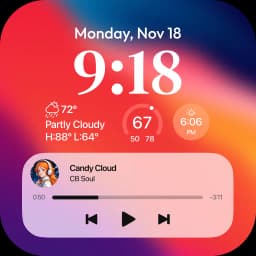
Screenshots
Lock Screen OS के बारे में
Lock Screen OS transforms your Android device with a customizable lock screen replacement that puts your favorite content and information front and center.
Reimaging your lock screen experience starts with full creative control. Personalize your lock screen with custom fonts, display widgets for at-a-glance information, and showcase your favorite photos as backdrops. Move beyond the standard Android lock screen and create a visual interface that reflects your style.
Switch between multiple lock screen designs instantly. Build different lock screens with unique wallpapers and styling, then toggle between them based on your mood or daily routine. Browse a gallery of wallpapers organized into themed collections, or pull from your own photo library for instant inspiration.
Stay informed without unlocking your device. View incoming notifications in expanded list view, compact stacked view, or keep them hidden entirely—you control how much information displays on your lock screen. Camera access while locked means you can capture moments instantly. Phone call notifications appear without requiring you to unlock, letting you answer or dismiss calls quickly.
Setup is straightforward. Grant the required permissions during initial installation: camera access for quick photo capture, phone state monitoring for call notifications, notification access to display alerts, storage permissions for wallpaper management, and accessibility services to enable the lock screen display. Once configured, you can set a custom passcode to secure your device and choose whether system notifications appear alongside your custom lock screen.
Lock Screen OS gives Android users a powerful alternative to the default lock screen, combining visual personalization with practical widget information and notification management. Download the app today and transform how you interact with your device the moment you wake it up.
फ़ायदे और नुकसान
फ़ायदे
- Customize lock screen with fonts, widgets, and personal photos
- Switch between multiple lock screen designs instantly
- View notifications and answer calls without unlocking device
- Quick camera access from lock screen to capture moments
नुकसान
- Requires camera, notification, storage, and accessibility permissions
- Custom passcode setup needed in addition to device lock
- Accessibility service access grants broad control over your device
- Notification display options may duplicate Android system notifications
संबंधित ऐप्स

AlienGUIse
Desktop themes and manager for Windows — transform your system with 5 futuristic designs.

SharpKeys
Remap keyboard keys to launch apps, media controls, and custom commands on Windows.

RocketDock
Desktop launcher for Windows — quick access dock with customizable icons and positioning.

Custom Resolution Utility (CRU)
Display resolution utility: Create custom resolutions for your monitor with precise refresh rate control.

Lagguy Wallpapers
Lagguy
4K & HD wallpapers for Android — minimal, abstract, nature, AMOLED designs with lifetime access

Gesture Control
Conena
Gesture navigation for Android—replace buttons with customizable swipes and taps. Fast, private, offline.
Latest Articles

Os melhores serviços em nuvem que valem a pena pagar ao lado do seu lab caseiro em 2026 (escolhemos 7)
Jul 25, 2026
Os melhores MMORPGs inspirados em D&D para desktop em 2026
Jul 25, 2026
Melhores utilitários gratuitos do sistema Windows que substituem ferramentas pagas (2026)
Jul 25, 2026
Melhores jogos de tiro solo ao estilo Splatoon para PC em 2026
Jul 25, 2026
Melhores jogos de ninjas estilo Naruto em desktop em 2026 (escolhemos 8)
Jul 25, 2026